•
•
•
•
•
•
•
•
•
•
•
•
•
•
•
•
•
•
•
•
•
•
•
•
•
•
•
•
•
•
•
•
•


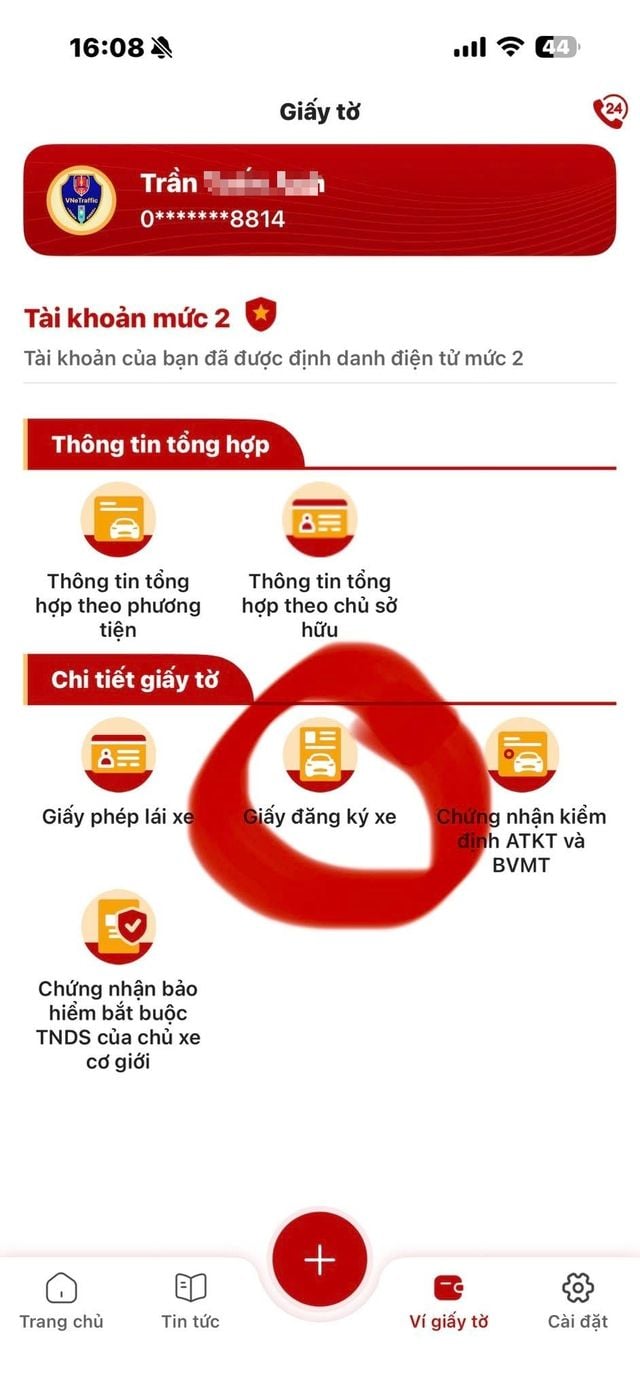
Police have issued guidance for residents to check and request the deletion of unfamiliar vehicles or vehicles that have been sold on the VNeTraffic app. To use the feature, residents must have VNeTraffic identity level 2 and update the app to the latest version. After meeting these requirements, users can follow the steps below.
Step 1: Log in to the VNeTraffic app.
Step 2: On the main screen, select Documents wallet, then Vehicle registration, and enter the passcode.
Step 3: Choose Confirm information and select the correct case for the request processing:
Step 4: Tick the box I confirm that the information provided is true, then press Submit information and Confirm to complete the process.
Police also noted that, until the official transfer is completed, citizens remain the legal owner registered on the vehicle and are responsible for issues related to the vehicle.




Premium gym chains are entering a “golden era” that is ending or already in decline, as rising operating costs collide with shifting consumer preferences toward more flexible, community-based ways to exercise. Long-term memberships are shrinking, margins are pressured by higher rents and facility expenses, and competition from smaller, more personalized…